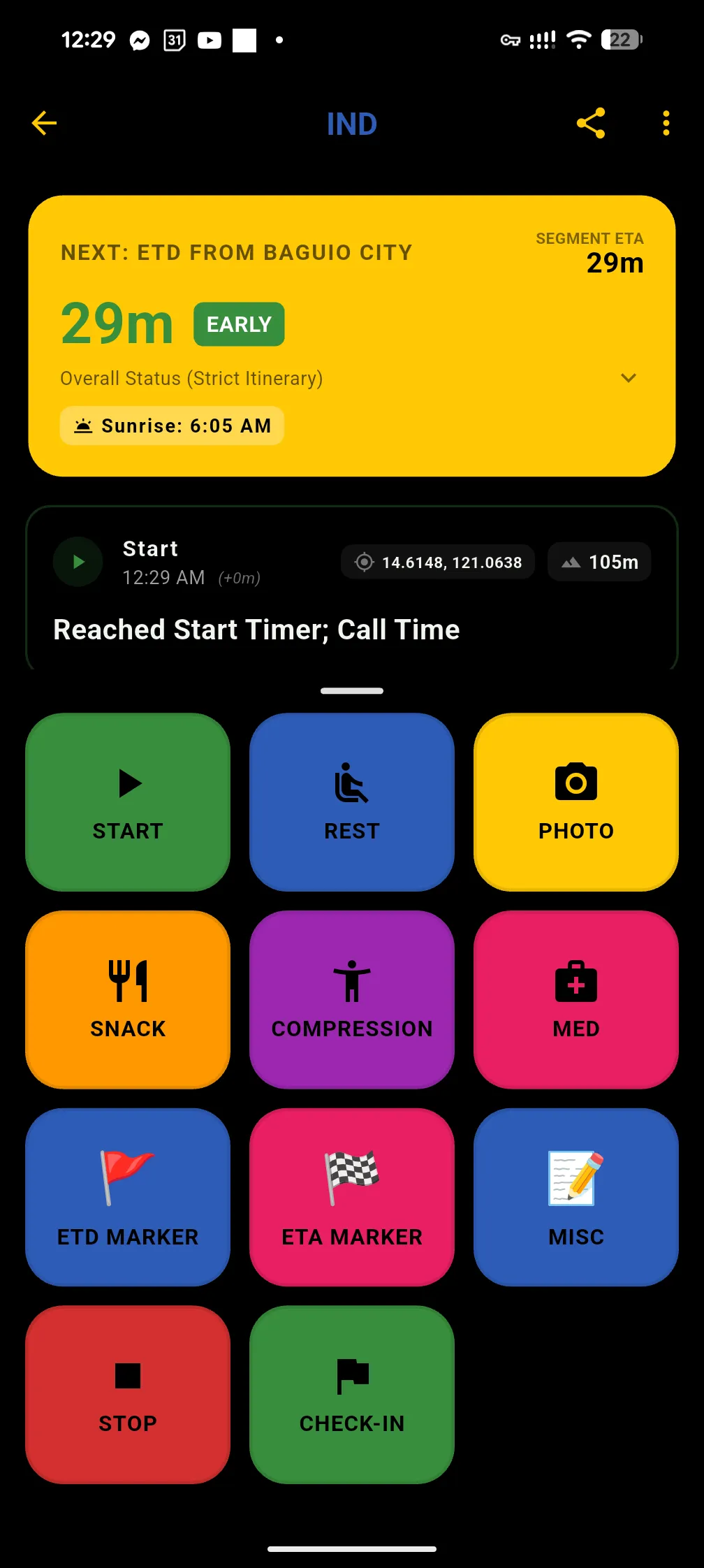
Before our induction hike, I figured I would need a low battery consumption scribing app. As the team scribe for the inductees group, I was in charge of noting down the fulfillment of the itinerary and any event along the trail. This included rest stops, landmarks, med stops, compression stops, snack stops, and misc stops with the time and optionally the location and a picture. I also needed to provide the team with insights regarding our itinerary: are we early? late? on time? and ETAs to next stops.
This was my first time developing on mobile and I needed a web-dev like framework for quick productivity, so I used Flutter with Dart. Since my main goal was “battery-sipping,” Flutter’s Ahead-of-Time (AOT) compilation was a huge win. Unlike React Native, which often relies on a JavaScript bridge to talk to the phone’s hardware, Flutter compiles directly to machine code. This reduces the CPU overhead every time I open the app to log a waypoint, ensuring the processor isn’t working harder than it needs to.
Flutter’s Skia/Impeller rendering engine ensures that the logbook looks and behaves exactly the same way regardless of whether my phone is in “Ultra Power Saving” mode or if I am using an older Android device. I don’t have to worry about platform-specific UI bugs while I’m on a summit. As a web developer, Dart’s syntax felt like a comfortable mix of TypeScript and Java, allowing me to build the UI and the logic much faster than if I had to dive deep into Kotlin or Swift. Flutter also allows for aggressive tree shaking, keeping the app footprint tiny on storage which is great when managing limited space and offline maps.
I chose Drift (a SQLite wrapper) because mountaineering logs involve complex relational integrity. A log belongs to a specific hike or expedition (which can be an instance of a route). These active expeditions contain logs that track time, type, optional photos, GPS data, and specific log types. SQLite handles these relational queries naturally and provides type safety that prevents runtime errors when I’m out on a trail with limited debugging ability.
Riverpod was the sweet spot for state management. Its AsyncValue made handling GPS lock states much cleaner, and the autoDispose feature is a great battery-saver because it ensures resources are wiped from memory as soon as I stop looking at a specific screen.
The primary challenge was ensuring the logic wasn’t too power draining. I focused on a Snapshot Strategy for GPS locking. Instead of using a constant stream of coordinates, the app only wakes up the GPS radio when I explicitly trigger an action. This keeps the radio off 99% of the time.
I also integrated three specific safeguards:
- Smart Caching: Reuses coordinates if they are less than 5 minutes old.
- 5-Second Kill Switch: Stops trying if a lock isn’t acquired within 5 seconds to prevent searching drain.
- No Streaming: Strictly avoids background location updates.
The UI uses an AMOLED theme with colors based on Loyola Mountaineers’ colors to save battery. I used big buttons and high contrast so it is easy to see under the sun and tap while wearing gloves. It features a drawer up design for the type of logs and a reverse chronological log for all entries.
Values like ETA and ETD figures only update when a new record is added rather than refreshing constantly. The app also features saved routes and exports to chat for quick updates to the team.